
SEOvault AI Multi-location management
Managing one business location is straightforward. Managing ten, fifty, or several hundred is not.
Every location has its own address, hours, coordinates, business identifiers, images, services, and local search context. A small inconsistency can affect the page, the schema, the store locator, and the information search engines use to understand that location.
SEOvault AI Pro extends the free SEOvault AI plugin with a dedicated Local SEO Pro module for this work. It adds location-level data controls, schema enhancements, map and display tools, reviews and offers, import tools, and WordPress administration features.
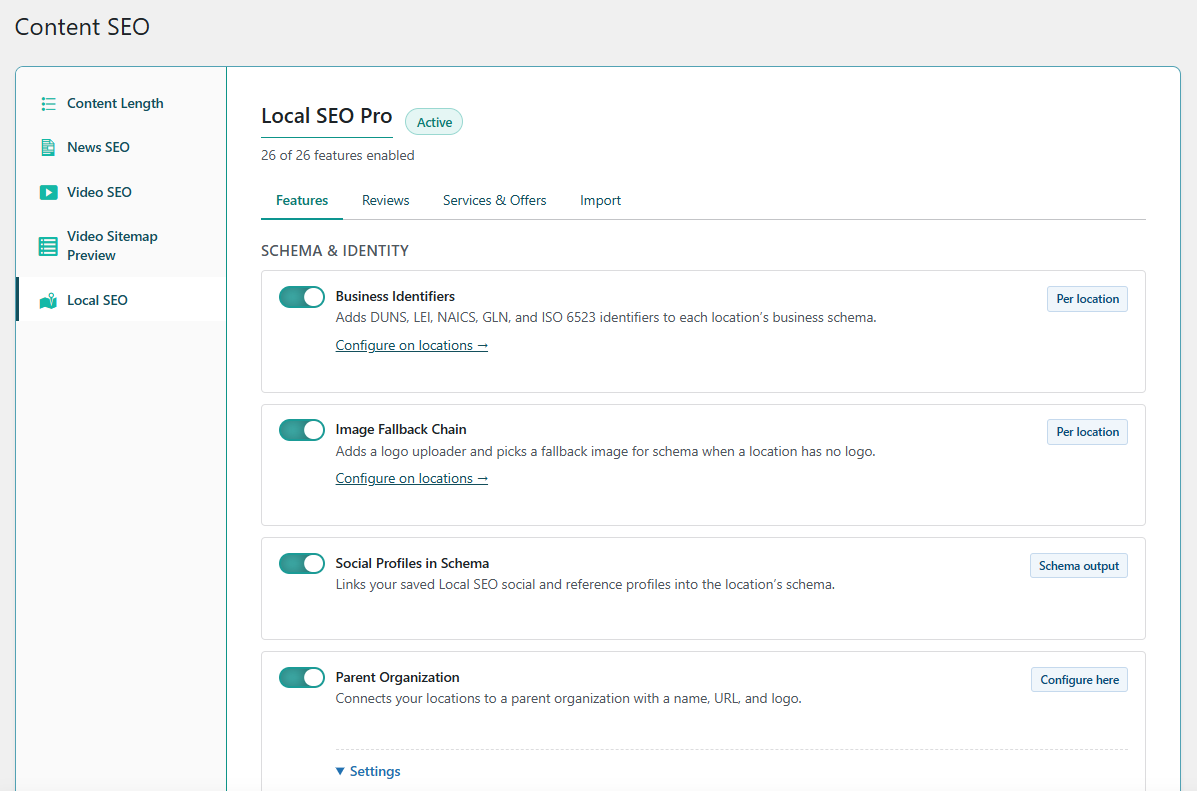
A complete multi-location toolkit
Local SEO Pro brings together 26 features for location data, business schema, maps, reviews, offers, imports, and WordPress administration:
- 20 features are marked stable
- 6 features are marked beta
The module requires an active Pro entitlement, and some features have their own Local SEO Pro toggle. The checklist below shows what is available today.
See the Local SEO Pro section on the SEOvault AI Pro page to see the module in context, or compare the Pro plans.
Schema and business identity
Location pages need more than a street address. They also need consistent identity signals and schema properties that describe the organization and each location.
- ✓ Business Identifiers (stable). Add DUNS, LEI, NAICS, GLN, and ISO 6523 identifiers to a location’s business schema.
- ✓ Image Fallback Chain (stable). Add a logo and define a fallback image for schema when a location does not have its own logo.
- ✓ Social Profiles in Schema (stable). Connect saved Local SEO social and reference profiles to the location schema.
- ✓ Parent Organization (stable). Connect individual locations to a parent organization with its name, URL, and logo.
- ✓ Knowledge Graph Integration (stable). Add organization-level knowledge graph properties to the saved schema.
- ✓ Schema Health Check (beta). Check a location’s saved schema for readiness and open Google’s Rich Results Test for further validation.
- ✓ Additional Schema Fields (beta). Add more supported properties to each location’s schema as the available schema surface grows.
These features are useful when a business has a clear organization structure, multiple brands or divisions, or location pages that need consistent identity information without copying the same values manually.
Location data and operating details
Location data changes. Opening hours change for holidays, a service area can cover a region without a storefront, and an international business may need different language and currency handling for each location.
- ✓ Per-Location Timezone (stable). Use each location’s own timezone when calculating opening-hours status.
- ✓ Address Format Templates (stable). Control how addresses are displayed and override the format for individual locations.
- ✓ Currencies (stable). Choose from more than 100 ISO 4217 currencies for price and offer data, with an optional location-level override.
- ✓ Holiday & Special Hours (stable). Override regular opening hours for holidays and other specific dates.
- ✓ Service Area Business (stable). Describe a radius or named service region for businesses that serve customers without a traditional storefront.
- ✓ Multilingual Locations (beta). Work with WPML and Polylang while preserving a stable identity for each location across languages.
This is the part of local SEO that often becomes a spreadsheet. Local SEO Pro moves those values into the location records and the schema that uses them.
Maps, blocks, and customer-facing displays
The data also needs to appear in the places customers use. Local SEO Pro includes tools for placing location information in content, widgets, and store locator interfaces.
- ✓ Local SEO Blocks (stable). Add six location-aware blocks to the WordPress block editor.
- ✓ Open Now Indicator (stable). Show whether a location is open at the current time in your content.
- ✓ Custom Map Markers per Category (stable). Use different store locator markers for different location categories.
- ✓ Classic Widgets (stable). Place location widgets from the WordPress Widgets screen.
The Open Now indicator and the location-aware blocks are content tools, while the marker and widget features help adapt the presentation to the way a site is organized.
Reviews and offers
Location pages often need more than contact information. They may also need a review workflow and a structured list of services or offers.
- ✓ Reviews (beta). Collect, moderate, and display first-party reviews with schema safeguards.
- ✓ Services & Offers (beta). Publish a visible list of services and offers for each location.
Both features are marked beta in the current registry. That does not make them imaginary or planned, but it is a signal to evaluate them in your own workflow before treating them as a finished replacement for a dedicated reviews or offers platform.
WordPress administration and integrations
Multi-location SEO is also an administration problem. The module includes tools for moving data into the plugin, finding locations quickly, controlling access, and keeping existing content workflows usable.
- ✓ Import from Other Plugins (beta). Migrate locations from supported local SEO plugins with preview, progress, and rollback.
- ✓ Geo Sitemap & KML (stable). Publish a geo sitemap and KML file so search engines can discover location data.
- ✓ Enhanced Location Search (stable). Search more location fields from the WordPress Locations admin list.
- ✓ Bulk Actions & Admin Columns (stable). Add useful columns and bulk actions to the Locations admin list.
- ✓ Yoast Shortcode Compatibility (stable). Accept documented Yoast local SEO shortcodes as aliases.
- ✓ Custom Capabilities (stable). Control which WordPress roles can manage locations.
- ✓ Admin Bar Quick Link (stable). Add a Local SEO shortcut to the WordPress admin bar.
The importer is particularly useful during a migration. It is designed to show progress and provide rollback rather than silently overwrite every location at once.
Important product boundaries
Local SEO Pro does not include direct Google Business Profile synchronization. It manages the location data, schema, pages, maps, sitemaps, and WordPress workflows on your site. Google Business Profile remains a separate platform and workflow.
There is no fixed location count advertised for the module. The practical limit depends on your site, hosting resources, and the number of location records your WordPress installation can manage comfortably.
Free SEOvault AI plugin and Pro work together
SEOvault AI Pro does not replace the free SEOvault AI plugin. It extends it.
The free plugin provides the location foundation, including the locations post type, LocalBusiness schema, store locator features, local shortcodes, opening hours, geo data, and the base KML/sitemap behavior. Pro adds the 26 Local SEO Pro features listed above and connects them to the existing location and schema system.
You can read the free plugin’s Local SEO and LocalBusiness schema guide for the foundation. Then use the Pro module when you need more location-level controls and operational tools.
Who needs Local SEO Pro?
Local SEO Pro is most useful when one or more of these situations apply:
- You manage several storefronts, offices, clinics, branches, or service areas.
- Opening hours and holiday schedules differ by location.
- You need location schema with organization identity, identifiers, images, social profiles, or service areas.
- You are migrating locations from another local SEO plugin.
- More than one WordPress role needs to manage location records.
- You want location data to appear in blocks, widgets, maps, schema, KML, and customer-facing displays without maintaining separate systems for each output.
If you only have one simple location and rarely change its information, the free plugin may cover the basics. Pro becomes more valuable as the number of locations, editors, languages, services, and operating rules increases.
See the module on the product page
The SEOvault AI Pro page shows the Local SEO Pro module alongside its current interface and the other Pro modules. You can also view the Single, Business, and Agency license options.
The important distinction is simple: the free plugin provides the local SEO foundation, while Local SEO Pro adds the controls needed to manage a larger and more varied location portfolio inside WordPress.